I published a new activity for teaching computer science searching/sorting concepts. It's designed for middle school students, although there's no reason why it wouldn't work for upper elementary or high school students.
Using CCG cards to teach searching/sorting
It introduces algorithms for searching and sorting by using Collectible Card Game (CCG) cards – like Magic the Gathering or Pokemon cards – as objects for the students to search/sort.
An advantage of using these cards is that they are easy to hold and don't take a lot of room, so each student can easily manage 10 cards on a standard school desk. And the activity scales to more or less cards, or students can work in groups if needed. The cards are also cheap (or free) if you're willing to look around, but you can always just go to the store and buy some (convenient if you're traveling and left your teaching props at home).
I've run this activity in a number of classes in different schools and it's a great way to demonstrate how these algorithms work.
18 March 2011

National Engineers Week outreach - Having engineers visit local schools
Recent K-12 outreach where Google engineers go out and visit local schools and talk about computer science:
http://googleblog.blogspot.com/2011/03/national-engineers-week-2011-classroom.html
Yes, that's my byline on the blog post. It was a lot of fun doing these visits (although it required a lot of prep-work in advance to get things set up).
http://googleblog.blogspot.com/2011/03/national-engineers-week-2011-classroom.html
Yes, that's my byline on the blog post. It was a lot of fun doing these visits (although it required a lot of prep-work in advance to get things set up).
17 February 2011
CS education is important for scientists
Philip Wadler's recent blog post "Scientific programming does not compute" draws attention to a Nature article from last October : "...Error ...why scientific programming does not compute" (Nature 467, pp.775-777 - 14 October 2010)
This article has some wonderful examples of why CS education is important to students interested in pursuing a career in the sciences.
So continuing with choice quotes from the article, a Toronto-based computer scientists named Greg Wilson conducted an online survey about the programming habits of scientists back in 2008. He received nearly 2000 responses and reported the following results:
What does the article suggest we do about this problem?
The crisis in K-12 computer science education is really a crisis for all the sciences.
This article has some wonderful examples of why CS education is important to students interested in pursuing a career in the sciences.
Researchers are spending more and more time writing computer software to model biological structures, simulate the early evolution of the Universe and analyze past climate data, among other topics.and
As a general rule, researchers do not test or document their programs rigorously, and they rarely release their codes, making it almost impossible to reproduce and verify published results generated by scientific software, say computer scientists.Although I imagine that computer scientists probably said that they rarely release their "code". Why is it so difficult for writers (and Hollywood) to understand that computer programming "code" is a mass noun (like "water"), and not a count noun (like "pumpkin"). I can only guess that people are confused by things like "secret codes" and think computer code is the same. Anyway, I digress...
So continuing with choice quotes from the article, a Toronto-based computer scientists named Greg Wilson conducted an online survey about the programming habits of scientists back in 2008. He received nearly 2000 responses and reported the following results:
45% said scientists spend more time today developing software than five years ago.
38% of scientists spend at least one fifth of their time developing software.
Only 47% of scientists have a good understanding of software testing.
Only 34% of scientists think that formal training in developing software is important..Wilson also added:
"There are terrifying statistics showing that almost all of what scientists know about coding is self-taught," says Wilson. "They just don't know how bad they are."Why does this matter? Well,. this lack of proper programming skills can lead to data being misinterpreted and incorrect results being published:
As a result, codes [grrr...] may be riddled with tiny errors that do not cause the program to break down, but may drastically change the scientific results that it spits out.The article then provides a number of interesting real-world examples:
- A structural biology group at a research center needed to retract 5 previously published papers when they found a bug in the program that analyzed their data.
- A computational biologist wrote some code based on assumptions that were valid for his work, but another group re-used his code in a different scenario where these assumptions did not hold true.
- The code used to analyze data from the Large Hadron Collider is so complex and convoluted that it is difficult for new researchers to come in and test or modify the code
What does the article suggest we do about this problem?
In the long tern, though, [software developer Nick] Barnes says that there needs to be a change in the way that science students are trained.and
Science administrators also need to value programming skills more highly, says David Gavaghan, a computational biologist at the University of Oxford, UK.In some sense, the article is calling for better software engineering skills (including documenting and testing) rather than raw programming skills. But the programming fundamentals need to come first for everyone.
The crisis in K-12 computer science education is really a crisis for all the sciences.
31 January 2011
Comments for K-12 STEM education
Today is the deadline for submitting comments to the NITRD request for information on strategies for meeting the goals set out in the recent PCAST report: "Designing a Digital Future: Federally Funded Research and Development in Networking and Information Technology" (Dec 2010).
The first 2 comment sections relate to particular industries (health case, energy, transportation, ...) or R&D, but the third section asks specifically about strategies for incorporating computer science into K-12 STEM education.
The rest of this post contains the comments that I submitted:3. The PCAST report calls for fundamental changes in K-12 STEM education in the United States, including the incorporation of computer science (CS) as an essential component.
a. What CS concepts are important to effective elementary, secondary, and post-secondary curricula? Among these concepts, which are commonly found in curricula today? Which are missing?
Elementary: (3rd-5th)
Currently, elementary schools are likely to cover "logic grid" puzzles and syllogisms, but not much more. Ideally, they should include at least the following:
- Number systems (specifically binary, octal and hexadecimal since these are the ones that matter for computer science)
- Boolean logic (and, or, xor, not): boolean variables and expressions
- Introduce the concept of simple variables (integer) here and relate to boolean values (x = 3 is either true or false)
Including a variety of different logic puzzles (Sudoku and similar) would also be beneficial.
In addition, elementary school should also cover the skills necessary to use a computer effectively and perform common tasks (word processing, web search, ...). This is necessary so that they are comfortable using computers when we introduce programming in later grades.
Middle School: (6th-8th)
In these grades, students should focus on understanding how computers work and learning how to write a basic program.
As part of "understanding how computers work", we need to demystify the operation of the computer. This is important because learning how to program doesn't give a complete picture of how computers operate. This section should include the following:
- Basic file formats (show how text, graphics, music and video are stored on a computer; explain difference between bitmap and vector graphics, and text vs. rich-text formats)
- How color is encoded (RGB encoding, compare with primary colors they were taught in elementary school)
- How computers work (basic description of how computers perform logic and math operations)
- Basic boolean algebra (DeMorgan's law, re-writing expressions)
- Simple electronics (hardwire or programmatically control an LED)
- Internet: What happens when a website is visited? How does the internet route traffic?
For "how to write a basic program":
- Programming constructs: variables, control flow, functions, objects, ... (exact set varies depending on languages chosen)
- Write simple programs (see below)
- Explore and contrast various general-purpose vs. special-purpose languages
- Using wildcards and regular expressions (in a programming language and in a shell/cmd prompt)
When having the student write simple programs, it is important that the core assignments are interesting and engaging. The best way to accomplish this is by having the project require significant creative input from the student. For example, creative writing for a text adventure or drawings for a 2D game. This approach gets the student to invest in the success of the project (since it's their story or artwork), so they are more motivated to learn how to make their characters work they way they want.
Note that rather than arguing about which programming language to teach, we should focus on introducing students to a number of different languages (at least 2 or 3). This is useful because each language has different strengths and weaknesses, and we don't want students to graduate thinking there is only one way to program. Frankly, I would expect the languages chosen to vary somewhat between school systems and the change over time.
In addition, in these grades it is also important to start teaching students about electronic privacy, security and information sharing. It makes sense to teach these subjects in the context of computer science and to give the students programming assignments that (directly or indirectly) explore these topics.
The goal should be for all 8th graders to graduate knowing that they (1) are capable of writing (simple) computer programs, and (2) have a basic understanding of how computers work.
High School: (9th-12th)
High school should introduce advanced programming topics (algorithms and data structures) just like high schools offer advanced chemistry and physics classes. Beyond 9th or 10th grade, these classes don't have to be required for all students, but they should be required for students interested in a science and technology track.
Overall
Overall, we should try to link CS projects to other subjects whenever it makes sense: We can motivate learning about trigonometry by showing how it is used in games to calculate distance and to detect (bounding sphere) collisions. We can talk about the math/physics behind gravity and acceleration when we want to have a character jump realistically on the screen. We can demonstrate the additive color properties of light and discuss prisms and rainbows when we introduce RGB color.
Once we have CS as a core subject, these links will be easier to make and will lead to a much richer learning environment for the students.
b. What do teachers need (including preparation and training, tools, and resources) to be able to deliver CS education effectively?
Training and ready-to-use classroom materials are key for all grade levels. Any materials that are created need to be supplemented with instructions showing how to use it properly in the classroom. Two types of instructors should be targetted here: teachers who know how to manage a class but are not very familiar with programming, and teachers who know how to program but are not familiar with teaching strategies and classroom management. These two groups are likely to make up the bulk of teachers during the first years when we introduce CS to the classroom.
There will also need to be programs offered for teachers to learn how to teach this material. Fortunately, most (if not all) school systems require regular teacher training for "clock hours". This is the perfect venue for reaching the teachers and bringing them up to speed with the material.
c. What factors are important in promoting student interest in CS?
I discussed some factors in the earlier sections, but the most important factor is simply that computer science needs to be included as part of the core K-12 curriculum.
An example which underscores the importance of this happened recently to a friend of mine. His daughter (age 12) had already taken a programming class or two and she was interested in participating in an after-school robotics class. However, even though she was interested, she decided not to sign up because none of her friends were planning to take the class and she didn't want to be "alone". Whenever I think about this, I wonder how many other students are missing out because of (even minimal) social pressures, and how many of her friends would have discovered that this was a subject that was interesting to them, if only they had been forced to try.
And remember, this was for someone lucky enough to have encouraging parents and teachers willing to organize this after-school class. Most students don't have those advantages.
I'm tempted to say that adding CS to the core is the only important factor and that it (almost) doesn't matter what we teach or how we teach it. Once we make CS a core requirement, everything else will (by necessity) follow. Of course, it's clearly better to teach it properly, but as long as we're willing to iterate and improve, even a less-than-perfect rollout will be of great benefit to the students.
05 December 2010
Materials for teaching transistors and logic gates
As part of my computer class that I teach to upper-elementary/middle-school students, I have a section on transistors and logic gates. The goal is to introduce the "atoms" (transistors) and "molecules" (logic gates) that are used in digital computation, and the topic ends with the students learning how computers perform addition.
Since I want to focus on digital computation, I try to keep the electricity part as simple as possible while still teaching the basics needed to understand how digital logic gates are implemented. For this reason, I discuss CMOS transistors. What's nice about CMOS is that there is no need to introduce any other electrical component (like resistors or capacitors) to understand how to build logic gates in CMOS.
In this simplified presentation, voltage is all that matters and we can basically ignore the details of electric current. All you need to know is that electrons at Ground potential (0V) represent '0's and electrons at Power potential (usually +5V) represent '1's.
Cards & Yarn
When I was first teaching this topic (a few years ago), I started by using laminated paper images of transistors that I connected with yarn (for the wires) using paper clips. The cards & yarn are used to layout a simple CMOS circuit and then the students have '0' and '1' markers flow through the circuit.
These were very low cost and worked acceptably well for the lesson.
But there were a few problems:
Laser-cut tiles
To address these problems with the paper & yarn approach, I started experimenting with using laser-cut wooden tiles. I drew a set of prototype tiles using Inkscape and had them fabricated either locally at Metrix Create:Space or online using Ponoko.
Each tile is roughly 1.5" on a side, and there are tabs on all sides so they can interlock like puzzle pieces. They need to be cut from opaque material, so I chose 1/8" inch wood stock.
Here are the basic tiles I created:
The tiles ended up looking very nice and the students find them much more satisfying to work with. I can now give each student (or pair of students) a set of tiles and a circuit to create and they will work independently.
Here are some pictures from the most recent batch of tiles (these ones arrived from Ponoko):
After removing the tiles, I group them into student packets that contain the tiles needed to construct the logic gates I cover in class.
Here are a few pictures of the students working with the tiles in class.
Sadly, the one downside to these materials is their cost. The paper & yarn version costs practically nothing, while having the tiles custom laser-cut can be rather expensive. This is especially true if you want to have enough materials for an entire class.
What about using real transistors?
Another option that I considered was to use actual transistors in class. However, I opted against it because:
Making available
I'll be releasing these materials in the near future: image files for laser-cutting (so you can cut your own tiles if you want) and worksheets for using the tiles in class. I'll also have the original transistor cards released as well since that's the low-cost way to try out these lessons.
Since I want to focus on digital computation, I try to keep the electricity part as simple as possible while still teaching the basics needed to understand how digital logic gates are implemented. For this reason, I discuss CMOS transistors. What's nice about CMOS is that there is no need to introduce any other electrical component (like resistors or capacitors) to understand how to build logic gates in CMOS.
In this simplified presentation, voltage is all that matters and we can basically ignore the details of electric current. All you need to know is that electrons at Ground potential (0V) represent '0's and electrons at Power potential (usually +5V) represent '1's.
Cards & Yarn
When I was first teaching this topic (a few years ago), I started by using laminated paper images of transistors that I connected with yarn (for the wires) using paper clips. The cards & yarn are used to layout a simple CMOS circuit and then the students have '0' and '1' markers flow through the circuit.
These were very low cost and worked acceptably well for the lesson.
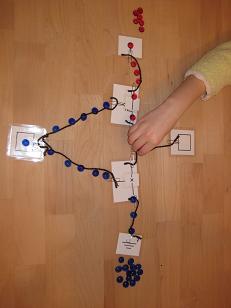 |
| Transistor cards connected with yarn |
- More difficult/time-consuming to build. In most cases, I ended up building the circuit and showing the students how it worked because it was a bit messy to get everything connected properly.
- Difficult to 'reset'. Once you were finished with one set of inputs, you need to remove all the markers to reset things for the next set of inputs. And you can't just sweep the markers away because that will mess up the connections. This made the activity less suitable for students to work on independently.
- Gets confusing when the yarn overlaps. With the NAND and NOR circuits, the yarn 'wires' overlap which can make it confusing to follow. This can be mitigated by using different colored yarn, but it's still a problem that needs to be dealt with.
- Weak against wind attacks. The materials are light, so a slight breeze from an open window can be enough to mess up your carefully constructed circuit. They can also be messed up easily by a student accidentally brushing their sleeve across the work area.
Laser-cut tiles
To address these problems with the paper & yarn approach, I started experimenting with using laser-cut wooden tiles. I drew a set of prototype tiles using Inkscape and had them fabricated either locally at Metrix Create:Space or online using Ponoko.
Each tile is roughly 1.5" on a side, and there are tabs on all sides so they can interlock like puzzle pieces. They need to be cut from opaque material, so I chose 1/8" inch wood stock.
Here are the basic tiles I created:
| Power |  |
 |
Ground |
| Input/Output |  |
||
| nMOS Transistor |  |
 |
pMOS Transistor |
| Straight wire |  |
 |
Bent wire |
| "T" connection |  |
 |
Wire crossover |
The tiles ended up looking very nice and the students find them much more satisfying to work with. I can now give each student (or pair of students) a set of tiles and a circuit to create and they will work independently.
Here are some pictures from the most recent batch of tiles (these ones arrived from Ponoko):
 |
| 9x9 tiles in package |
 |
| Removing the upper wax protective sheet |
 |
| Close-up of nMOS & pMOS transistor tiles |
 |
| Removing tiles from the sticky wax backing paper |
After removing the tiles, I group them into student packets that contain the tiles needed to construct the logic gates I cover in class.
 |
| Starting to build... |
Here are a few pictures of the students working with the tiles in class.
 |
| Building an inverter |
 |
| Constructing a NAND gate |
 |
| Another student's NAND gate |
Sadly, the one downside to these materials is their cost. The paper & yarn version costs practically nothing, while having the tiles custom laser-cut can be rather expensive. This is especially true if you want to have enough materials for an entire class.
What about using real transistors?
Another option that I considered was to use actual transistors in class. However, I opted against it because:
- Students can't see what's going on. The transistor itself is a black lump of plastic with 3 wires coming out and the electrons are not visible in the wires. While this might not be a serious problem for older students, I wanted the materials to be appropriate for younger students as well.
- Adding LEDs requires more knowledge of electronics. If we want to add LEDs to make the input/output values visible, then we need to pay more attention to electrical current and also add resistors. This would not only complicate the lesson, but it would also introduce material that would be a distraction from the primary goal of understanding digital logic.
- I'll be covering electronics later anyway. Later in the school year, we'll be working with Arduinos and lighting up LEDs. No need to rush this material now.
Making available
I'll be releasing these materials in the near future: image files for laser-cutting (so you can cut your own tiles if you want) and worksheets for using the tiles in class. I'll also have the original transistor cards released as well since that's the low-cost way to try out these lessons.
27 November 2010
Computer Class - Week #4
This post summarizes the material from week 4 of my computer class and includes a rough approximation of how I presented the material. These notes are not completely polished, so some of the transitions may seem abrupt.
Perfect shuffles
Materials needed: 2 decks of cards for every 8 students in the class. The two decks should each have a different colored back. I picked up a set of decks from CostCo that had an assortment of red and blue decks, but it doesn't matter as long as the card backs are obviously different.
I start class by handing out a small set of cards to each student:
Activity: Perfect card shuffling
This is an interesting follow-up activity after you've introduced binary numbers to the students. The general idea is to have the them perform the shuffles, record the position of the Ace and then "discover" the pattern of binary numbers in the results.
Note that the worksheets are set up so that the cards are optional for the students. They can see where the Ace goes just by following the arrows on the worksheets.
If you intend to perform this, I recommend you practice shuffling a bit before teaching this the first time. Performing perfect shuffles is actually rather easy if you go slowly and carefully (it becomes hard when you want to make it look like a real shuffle but that's not necessary for this class). The hardest part of shuffling the cards for class is getting used to shuffling only 10 cards.
Boolean Logic
A boolean value is a way of describing objects by specifying whether a particular attribute is True or False. For example, a light could have the attribute 'isOn' which is True when the light is turned on and False when the light is off.
These attributes can be anything that you can give a True/False answer to:
Boolean logic is an attempt to formalize the thought process and these expressions are used in computer programs (including games) to control what happens.
Also note that there are only 2 values: True and False. This sounds a lot like binary, with 0=False and 1=True. This is not a coincidence and we'll be discussing that in more detail later.
Activity: Describe objects in the room
In addition to the basic attributes, there is also a set of boolean operators that can be used to combine these properties to create new ones. For example:
NOT
The NOT operation changes True to False and vice versa. So if 'isCat' is True, then 'NOT isCat' is False.
Note that in English, we would probably say “is not a cat”. In logic, we say “not is-a-cat” or 'NOT isCat'.
AND
a AND b is True only if a and b are both True.
So if you have 2 boolean statements 'isCat' and 'hasStripes', then 'isCat AND hasStripes':
OR
a OR b is True if either a or b (or both) are True.
So 'isCat OR hasStripes':
XOR
a XOR b is True if either a or b (but not both) are True .
So, 'isCat XOR hasStripes':
NAND, NOR, XNOR
For convenience, we also have NAND, NOR and XNOR, which are simply shorthand for NOT-AND, NOT-OR and NOT-XOR.
Note that XNOR is not a great name - it would be more accurate to call it NXOR. However, XNOR is the commonly accepted name (and in any case, 'ex-nor' is slightly easier to say than 'en-ex-or').
Object Properties
These worksheets introduce the students to describing objects with boolean variables like "isBlack" or "isCircle". For each object, they identify whether each boolean value is True or False.
Worksheet: Object properties
After determining the attribute values for each object, the students will then group related objects. Finally (on the 3rd worksheet), they will construct boolean expressions that are True for a selected set of objects (without including any extras).
Nethack
Nethack is a dungeon exploration computer game that was originally released in 1987. In this activity, we discuss the boolean properties and expressions used in Nethack to determine when the player is petrified (turned to stone) by a cockatrice (one of the monsters in the game).
Activity: Boolean logic - Nethack
Describing Objects
In this activity, I go around the room and ask each student to think of an object and then think of a property that can be used to describe it. For example, you could think of an Apple and describe it as being "red" or "green" or "tasty".
I take the most interesting of these descriptive terms, convert it into a boolean True/False attribute and write it on the board. Once you go around the entire class, you should have a fairly useful set of attributes on the board.
For this particular class, the students came up with:
I was actually quite surprised how creative the students were with their responses. Here are a number of examples from class:
Once the students have given a couple of objects from the AND operator, these can now be used to test their understanding of NOT, OR and XOR. For this part, I take a couple of attributes, combine them with OR and XOR (and optionally use a NOT) and then ask if the expression is True or False for each object:
Describing Objects II
For the last activity, I bring in a set of related objects and have the students create attributes to describe them.
For this class, I brought in some Lego bricks (of different colors and sizes) and a few playing cards. The students came up with the following descriptive attributes:
In retrospect, the Lego bricks were probably a bit too small and perhaps a bit too distracting, but they worked well enough. Next time, I may experiment with different (larger) objects.
Perfect shuffles
Materials needed: 2 decks of cards for every 8 students in the class. The two decks should each have a different colored back. I picked up a set of decks from CostCo that had an assortment of red and blue decks, but it doesn't matter as long as the card backs are obviously different.
I start class by handing out a small set of cards to each student:
- 1 Ace (e.g., Ace of Spades with red card back)
- 9 cards 2-10 in a different colored suit and different colored back from the Ace (e.g., 2-10 of Hearts with blue card back)
Activity: Perfect card shuffling
This is an interesting follow-up activity after you've introduced binary numbers to the students. The general idea is to have the them perform the shuffles, record the position of the Ace and then "discover" the pattern of binary numbers in the results.
Note that the worksheets are set up so that the cards are optional for the students. They can see where the Ace goes just by following the arrows on the worksheets.
If you intend to perform this, I recommend you practice shuffling a bit before teaching this the first time. Performing perfect shuffles is actually rather easy if you go slowly and carefully (it becomes hard when you want to make it look like a real shuffle but that's not necessary for this class). The hardest part of shuffling the cards for class is getting used to shuffling only 10 cards.
Boolean Logic
A boolean value is a way of describing objects by specifying whether a particular attribute is True or False. For example, a light could have the attribute 'isOn' which is True when the light is turned on and False when the light is off.
These attributes can be anything that you can give a True/False answer to:
- isRaining – True if it's raining outside, False otherwise
- hasRaincoat – True if you have a raincoat, False if you don't
Boolean logic is an attempt to formalize the thought process and these expressions are used in computer programs (including games) to control what happens.
Also note that there are only 2 values: True and False. This sounds a lot like binary, with 0=False and 1=True. This is not a coincidence and we'll be discussing that in more detail later.
Activity: Describe objects in the room
Have students choose objects in the room and then come up with boolean attributes to describe the objects. When the students suggest an attribute (like 'it's bigger than my head') convert it into a True/False boolean attribute ('isBiggerThanMyHead'). As new objects are brought up, discuss whether the attributes from the previous objects would be True or False for the new object.Boolean Operations
In addition to the basic attributes, there is also a set of boolean operators that can be used to combine these properties to create new ones. For example:
getsWet = isRaining AND NOT hasRaincoatThese boolean operations are NOT, AND, OR and XOR.
NOT
The NOT operation changes True to False and vice versa. So if 'isCat' is True, then 'NOT isCat' is False.
Note that in English, we would probably say “is not a cat”. In logic, we say “not is-a-cat” or 'NOT isCat'.
AND
a AND b is True only if a and b are both True.
So if you have 2 boolean statements 'isCat' and 'hasStripes', then 'isCat AND hasStripes':
- is True for striped cats
- is False for spotted cats or striped dogs
OR
a OR b is True if either a or b (or both) are True.
So 'isCat OR hasStripes':
- is True for striped cats, spotted cats, striped dogs
- is False for spotted dogs
XOR
a XOR b is True if either a or b (but not both) are True .
So, 'isCat XOR hasStripes':
- is True for spotted cats, striped dogs
- is False for striped cats, spotted dogs
NAND, NOR, XNOR
For convenience, we also have NAND, NOR and XNOR, which are simply shorthand for NOT-AND, NOT-OR and NOT-XOR.
Note that XNOR is not a great name - it would be more accurate to call it NXOR. However, XNOR is the commonly accepted name (and in any case, 'ex-nor' is slightly easier to say than 'en-ex-or').
Object Properties
These worksheets introduce the students to describing objects with boolean variables like "isBlack" or "isCircle". For each object, they identify whether each boolean value is True or False.
Worksheet: Object properties
After determining the attribute values for each object, the students will then group related objects. Finally (on the 3rd worksheet), they will construct boolean expressions that are True for a selected set of objects (without including any extras).
Nethack
Nethack is a dungeon exploration computer game that was originally released in 1987. In this activity, we discuss the boolean properties and expressions used in Nethack to determine when the player is petrified (turned to stone) by a cockatrice (one of the monsters in the game).
Activity: Boolean logic - Nethack
Describing Objects
In this activity, I go around the room and ask each student to think of an object and then think of a property that can be used to describe it. For example, you could think of an Apple and describe it as being "red" or "green" or "tasty".
I take the most interesting of these descriptive terms, convert it into a boolean True/False attribute and write it on the board. Once you go around the entire class, you should have a fairly useful set of attributes on the board.
For this particular class, the students came up with:
- isBouncy
- isYummy
- isFrozen
- canTalk
- isFuzzy
- isAddictive
- isWet
- isSquishy
I was actually quite surprised how creative the students were with their responses. Here are a number of examples from class:
- isYummy AND isSquishy = jello
- isFuzzy AND isFrozen - ice kitty (kitty frozen in snow)
- isFurry AND isYummy - kiwi
- isWet AND isSquishy - squid
- isAddictive AND isYummy - brownies
- isYummy AND isBouncy - grapes
- isFurry AND isSquishy - gerbil (although you really shouldn't squish it!)
Once the students have given a couple of objects from the AND operator, these can now be used to test their understanding of NOT, OR and XOR. For this part, I take a couple of attributes, combine them with OR and XOR (and optionally use a NOT) and then ask if the expression is True or False for each object:
- isFurry OR isWet
- squid (T), brownies (F), ice kitty (T), ...
- isYummy XOR isAddictive
- brownie (F), jello (T), gerbil (F), kiwi (T), ...
Describing Objects II
For the last activity, I bring in a set of related objects and have the students create attributes to describe them.
For this class, I brought in some Lego bricks (of different colors and sizes) and a few playing cards. The students came up with the following descriptive attributes:
- isSquare
- isRectangle
- isGrayDark
- isGrayLight
- isPlastic
- is2x4
- is2x2
- isRed
- isPaper
- isBlack
- isLimeGreen
- isAce
- isLetter
- isHearts
In retrospect, the Lego bricks were probably a bit too small and perhaps a bit too distracting, but they worked well enough. Next time, I may experiment with different (larger) objects.
Subscribe to:
Posts (Atom)